தமிழில் தொழில்நுட்ப தகவல் தருவதே எமது நோக்கம்

Latest Post
3d game Airtel tips Ajith tips All in one App Android Application Android Application - WhatsApp Tricks Android hard reset tips Android tips Android tips and software Audio editing software AVG Antivirus 2016 Serial Key AVG Antivirus Antivirus 2016 Serial Key Backup app Battery life tips Best offline map Boot Animation Budget Smart phone Camera security app Charger tips Cinema news City racing 3d unlimited money apk Clash of clans Hack apk Computer tips Computer tips and software CPU testing apk Ekalapai keyboard Facebook like Facebook tips Facebook videos download new way Fingers print lock Free purchase Free Recharge Gadgets - Offers Zone Google indore map Hard Reset tips How to any Android mobile Unlock How to candy crush life lime Hack How to change ur operator How to create blog How to delete duplicate files permanent Android devices How to install Lollipop on pc How to know IMEI num How to root How to root Android device I phone tips IDM crack Live tamil Channel Low budget windows 10 lap Mobile details Mobile tips MobileAwareness Mx player pro New Mobile New WhatsApp Offer Omni Swipe One of the best Android mobile app One of the best Android Notification app One of the best Android photo editing App Otg என்றால் என்ன? Payum puli Movie Pen drive tips Photoshop Tutorial Playstore Application tips Ram increase tips RAR File tips Recovery app Root tips Samsung tips Secret code Smart app lock Subway surfers mod apk Sunday special Game System App Remover Tamil tips Technology Tips&Trick Thala Useful Wepsites Volume increase app Wepsite create Whatsapp tips Whatsapp trick WiFi Connection how to Secure WiFi hack WiFi tips WinRAR Setup Xbooster pro YouTube tips YouTube trick YouTube video tips Zip தல டீசர்

(YouTube) இல் வீடியோக்களை பார்க்கும் போது இதர அப்ளிகேஷன் களை பயண்படுத்த முடியவில்லையா ?இனி்அந்த கவலை வேண்டாம் நான் தரும் அப்ளிகேஷன ஐ பயன்படுத்துங்கள் (YouTube) வீடியோகளை பார்த்து கொண்டே (WhatsApp, Facebook, Twitter, google,) இன்னும் உங்கள் மபைலில் உள்ள அனைத்து அப்ளிகேஷன் களையும் பயன்படுத்த முடியும் ....இதனால் உங்கள் (Data) அதிகம் வீண்டிக்காமல் பயண்படுத்தலாம்,,,,


கீழ் காணப்படும் லிங்கில் சென்று இதற்கான அப்ளிகேஷன் ஐ (Download) செய்து கொள்ளுங்கள்


YouTube ல் உள்ள videoக்கள எளிமையாக download செய்ய
பல நண்பர்களுக்கு  YouTube videoக்களை ss முறையில் டவுன்லோட் செய்யும் வழிமுறை தெரியாமலேயே இருக்கிறது


இதன் மூலம் YouTube videoவை உங்களது  browser இலோ அல்லது  download manager ஐயோ கொண்டு எளிமையாக  download செய்துவிடலாம் அதை பற்றிய விபரங்களை பார்க்கலாம்

(நான்  uc browser  mobile version லில் இதனுடைய செயல் முறையை விளக்குகிறேன் நீங்கள் உங்களுக்கு விருப்பமான  browser ல் இதை முயற்ச்சித்துப் பாருங்கள்)


முதலில் உங்களது  browser ல் இருந்து  YouTube.com சென்று அதில் நீங்கள் டவுன்லோட் செய்ய நினைக்கும்   videoவை தேர்வு செய்யுங்கள்


அதனுடைய address barல் அந்த   videoவிற்கான  linkல் உதாரணமாக  m.YouTube/watchஎன்பதாக இருக்கும் அதில்  m ஐ நீக்கிவிட்டு  ss என்று சேர்த்துக்கொண்டு  (example ssyoutube.com/watch) search கொடுத்தால் வேலை முடிந்தது.


அடுத்து வரும்  linkல் அந்த வீடியோவின் டவுன்லோட் லின்க் அதனுடைய  formatகள் வாரியாக உங்களுக்கு காண்பிக்கப்படும் அதி உங்களுக்கு தேவையான   formatகளில்  browserலேயோ அல்லது download managerஇலோ  download செய்துவிடலாம்


இன்டைக்கு நாம் பார்க்க இருக்கும் பதிவு Candy Crush Game பற்றி தான் 
சில வருடங்கள் முன் வெளியான இந்த ஸ்மார்ட் மொபைல் போன் விளையாட்டு. மிகவும் பிரபலாக விளையாடப்பட்டது.
அது தொடர்பான பதிவுதான் இன்று நாம் பார்க்க இருக்கின்றோம்.   


உங்களுடைய Candy Crush Life Time முடிஞ்சால் நீங்கள் இரண்டு அல்லது முன்று நாட்கள் செல்லும். அதை நான் எவ்வாறு இலகுவாக பெறலாம் என்று பார்போம்.


முதலில் உங்களுடைய மொபைல் போனில் Setting >> Date & Time கிளிக் செய்து உங்களுடைய திகதியை மாற்றிக்கொள்ளுங்கள். 
உதரணமாக:- ஒரு முன்று நாட்கள் அல்லது ஐந்து நாட்கள் முன்னால் மாற்றிக்கொள்ளுங்கள். 


இதனை செய்துவிட்டு மீண்டும் உங்களுடைய Candy Carush Open செய்து பாருங்கள். Candy Carush Life Time Full என்று இருக்கும்.


கம்ப்யூட்டர் சந்தையை உற்று நோக்கினால் அதன் வளர்ச்சியை கண் கூடாக பார்க்க முடியும். தொழில்நுட்ப சந்தையானது சிறிய கணினி மற்றும் கைகளில் எடுத்து செல்ல வசதியாக இருக்கும் கணினிகளின் வரவு அதிகரித்து இருக்கின்றது என்று தான் கூற வேண்டும்.

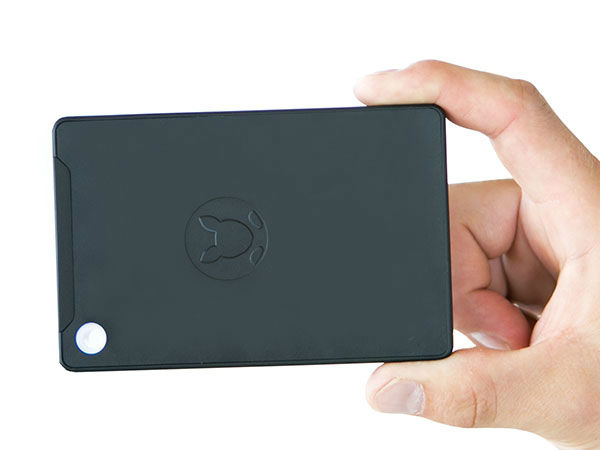
அந்த வகையில் அமெரிக்க மின்சாதன நிறுவனமான இன்ஃபோகஸ் கங்காரு எனும் புதிய வகை கணினியை சந்தையில் அறிமுகம் செய்திருக்கின்றது.

31-1446292593-01.jpg

சாதனை

உலகின் சிறிய கணினி என்ற பெருமையை கொண்டிருக்கும் இந்த கணினி 124 எம்எம் நீளம், 80.5 எம்எம் அகலமும் 12.9 எம்எம் சுற்றளவும் கொண்டிருக்கின்றது.

31-1446292595-02.jpg

சிறப்பம்சம்

இந்த கணினியில் கழற்ற கூடிய ஒரே பேஸ் யூனிட், எச்டிஎம்ஐ போர்ட், யுஎஸ்பி 2.0 போர்ட், யுஎஸ்பி 3.0 போர்ட், டிசி பவர் போர்ட் வழங்கப்பட்டுள்ளதோடு இதன் மொத்த எடை 200 கிராம் என்பதும் குறிப்பிடத்தக்கது.

31-1446292596-03.jpg
 
கைரேகை ஸ்கேனர்

கங்காரு கணினியில் விண்டோஸ் ஹெல்லோ கைரேகை சென்சார் வழங்கப்பட்டுள்ளது.

31-1446292597-04.jpg

பிராசஸர்

கங்காரு கணினியில் குவாட் கோர் செர்ரிடிரயல் ஆடம் எக்ஸ்-5-இசட்8500 பிராசஸர் வழங்கப்பட்டுள்ளது.

31-1446292599-05.jpg

மெமரி

2 ஜிபி ரேம், மற்றும் 32 ஜிபி இன்டர்னல் மெமரியோடு கூடுதலாக 128 ஜிபி வரை மெமரியை நீட்டிக்கும் வசதியும் வழங்கப்பட்டுள்ளது.

31-1446292600-06.jpg

பேட்டரி

நான்கு மணி நேரம் வரை பேக்கப் வழங்கும் பேட்டரியும், சார்ஜ் செய்ய மைக்ரோ-யுஎஸ்பி போர்ட் ஒன்றும் வழங்கப்பட்டுள்ளது.

31-1446292601-07.jpg

மென்பொருள்

கங்காரு கணினி மைக்ரோசாப்ட் நிறுவனத்தின் புதிய விண்டோஸ் 10 இயங்குதளம் கொண்டிருக்கின்றது.

31-1446292602-08.jpg

கனெக்டிவிட்டி

இந்த சிறிய கணினியில் வை-பை 802.11ac மற்றும் ப்ளூடூத் 4.0 கனெக்டிவிட்டி வழங்கப்பட்டுள்ளது.

31-1446292604-09.jpg

விலை

இந்தியாவில் கங்காரு கணினியின் விலை ரூ.6,500 வரை இருக்கும் என எதிர்பார்க்கப்படுகின்றது.

31-1446292605-10.jpg

விற்பனை

நவம்பர் மாதத்தின் மத்தியில் மைக்ரோசாப்ட் ஸ்டோர் மூலம் கங்காரு கணினி விற்பனை செய்யப்படும் என எதிர்பார்க்கப்படுகின்றது.

31-1446292606-11.jpg

இண்டர்நெட்

இந்த கருவியை கொண்டு இண்டர்நெட் ப்ரவுசிங், வீடியோ கேம், மற்றும் ஃபுல்-எச்டி வீடியோ உள்ளிட்டவைகளை பயன்படுத்த முடியும்.

உங்கள் ரூட் (Root) செய்த மொபைலில் (Default) ஆக உள்ள அப்ளிகேஷன் களை அழிக்க முடியவில்லையா இதோ இதற்கான தீர்வு கீழ்காணும் லிங்கில் சென்று (Download) ,செய்துகொள்ளுங்கள் 👇👇👇👇👇

System App Remover 👇👇👇


System App Remover Pro v3.5.1012 APK is Here ! [Latest]

  • System App Remover Pro [3.4 1012]
    This app provide ways to uninstall system app, uninstall user app, move app to sdcard, move app to phone, find all apk on sdcard, install apk, delete apk, rooting guide help.
    Features
    • Safe, we filter out all apps that may cause unstable after uninstalled, and had tested hundreds of devices, so you can use it safely, but we can not make sure 100% safe because of manufacturers may customized too much, also, we backup all app you uninstalled automatic, so you can restore them in Recycle Bin whenever you need.
    • Clear, we classify all system app as [Could remove], [Should keep], [Key module], so you can choose what app to uninstall clearly.
    • Easy, we provide you a way to uninstall multi app in one time, make you easy to go.
    • Small, we release all memory allocated while app exit, and may the smallest app.
    How to install ?
    1. Uninstall any previous version of System App Remover Pro (IF INSTALLED)
    2. Download and Install System App Remover Pro from the links given below
    3. Done, Enjoy :)
    What’s New
    • Added uninstall suggestion for several new devices
    • Bug fixes
    • No advertisements
    Note : Root Required
    Screenshots
    Downloads

Avast 2015 All Working Cracks+Keys are Here ! [LATEST][UPDATED]


  • Avast! 2015
    Avast! 2015 latest versions has been released and now available at ONHAX with crack.
    The Most Trusted Security – 220 million people choose AVAST to keep them safe online – more than any security company. avast! is the most trusted name in the antivirus industry, actively protecting more than 220 million people around the world. We’ve been protecting devices and data for over 25 years, in over 40 languages, on every populated continent.
    Credits to ZeNiX For Crack !
    What’s new in version 2015
    • HTTPS scanning: Now, we are able to detect and decrypt TLS/SSL protected traffic in our Web-content filtering component. We are using our own generated certificates that are added into the Root Certificate store in Windows and also into major browsers. This feature will protect you against viruses coming through HTTPs traffic as well as adding compatibility for SPDY+HTTPS/ HTTP 2.0 traffic. You can tune/disable this feature in the settings section.
    • Home Network Security: Scan your home network for vulnerabilities (wifi status, connected devices, router settings, factory passwords, etc.). This is quite a new approach as we are trying to discover potential problems not isolated on the particular device only, but in the entire network of devices you use or connect to the Internet from.
    • SecureDNS: We are introducing a new provider which guards against unprotected DNS/DNS hijack on a router/client (including unsecured networks, public ones, etc.).
    • Smart Scan: Integrated all on demand scans into one (Antivirus, Software updates, Home Network, GrimeFighter). One scan, different results and recommendations.
    • New Support System: Easy contact for paid users to submit a ticket with all info included automatically. Improved knowledge base for free users. Help is completely online and is more up to date.
    • General bugfixing: This covers a lot of stability and performance changes in all components (but the main focus was traditionally on the network and engine components).
    • GrimeFighter Free: GrimeFighter will offer free cleaning of junk files and tuning of system settings. These tasks are performed by our Zilch and Torque minions. Other minion functions remain as paid-for features.
    • AVAST NG: A hardware based virtualization solution capable of running each Windows process in standalone safe virtualized environment (VM) and fully integrated to your desktop. Each process is executed in its own instance of VM, which means totally isolated from your other applications. This feature is now powering the Avast DeepScreen, resulting in better detection. The technology will also eventually power the Sandbox and SafeZone components (although it does not now).
    Crack can Activate ?
    • Avast! Pro Antivirus
    • Avast! Premier Antivirus
    • Avast! Internet Security
    How to Use Crack ?
    1. Uninstall any previous version installed throughout using any uninstaller
    2. Install the latest version of crack provided below and install it as trial version
    3. Launch it and disable Self-Protection module from Settings >>> Troubleshooting
    4. After cracking(which methods are explained below) just enable Self Protection module
    5. After reboot the system; just activate the trial licence using your internet
    6. That’s it Enjoy :)
    Direct Download Link


    Methods of Cracking
    1. Manual
    2. Automatic
    Manually Cracked
    1. Rename [ZeNiX.dll] to Version.dll
    2. Copy Version.dll to these folders
    3. C:\Program Files\AVAST Software\Avast\
      C:\Program Files\AVAST Software\Avast\Setup
    4. Delete Userenv.dll from above folers, if you find any.
    5. Reboot
    Automatic Cracked
    1. Install the .exe file for windows 8,7,&  vista user and .reg file for windows XP users
    2. At last; it will ask for reboot; just reboot the system
    How to Activate Using Serial Keys ?
    1. Download & Install Antivirus Edition That You Need
    2. Download Serials Package from link given below
    3. Double click on License file according to your product
    4. Click Yes–>Ok
    5. That’s It ! Your Product Activated
    6. Enjoy ! :)
    Screenshots
    Downloads


ஸ்மார்ட் போன் நனைந்து விட்டதா? கவலை எதுக்கு... அரிசி இருக்கு!

தண்ணீரில் ஸ்மார்ட் போன் விழுந்த விளைவு... 
போன் ஆன் ஆகுது, Incoming call வருது; ஆனா touch screen work ஆகலை; Touch screen work ஆகாம போன்ல எதையுமே பண்ண முடியல; Phone ஐ unlock கூட பண்ண முடியலை;

Eq3OztA.jpg

Google -ல பாா்த்தேன்.
இப்படி போன் தண்ணீரில் நனைந்து விட்டால், phone back cover, sim card, memory card, battery எல்லாத்தையும் கழற்றி விட்டு, ஒரு air lock cover-ல அரிசிய போட்டு, அதுக்குள் phone-ஐ போட்டால், phone-க்குள் இருக்கும் தண்ணீரை அரிசி உறிஞ்சி விடுமாம். அரிசியால LCD Screen க்கு பின்னால் இருக்கும் தண்ணீரை கூட உரிஞ்ச முடியும் என்று Google கூறியது.

air lock cover-க்கு எங்கே போவது என நினைக்கையில், "பேசாம phoneஐ அரிசி பாத்திரத்துக்குள்ளேயே போட்டுட்டா என்ன?" என , phoneஐ அரிசி பாத்திரத்துக்குள் போட்டு புதைச்சுட்டு, அரை மணி நேரம் கழித்து எடுத்து பார்த்தேன்.

WOW... Touch Screen இப்போ நல்லா ஒர்க் ஆகுது. உடனே outgoing calls போகுதா, key pad work ஆகுதா, music play ஆகுதா-னு எல்லாம் செக் பண்ணிணேன். Rear Camera lensல தண்ணீர் திரை (bubbles) போல தெரிந்தது. 

மறுபடியும் அரை மணி நேரம், அரிசியின் உதவி தேவைப்பட, இப்போ என் phone- perfectly alright.


எதிர்பாராம உங்களில் யாராவது மழையில் போனுடன் நனைந்து விட்டால், இந்த தகவல் உபயோகமாக இருக்கும்!!! 

MKRdezign

Contact Form

Name

Email *

Message *

Powered by Blogger.
Javascript DisablePlease Enable Javascript To See All Widget